
Adelia Risk installs a small program called DNSFilter on your work computer. Every time your computer looks up a website address, DNSFilter checks it against lists of dangerous and off-limits sites and turns the request away if it matches. It runs in the background and you will rarely notice it. This page shows what you might see and what to do.
Why we use it
Most attacks start with a click on a bad link, in an email, a search result, or an ad. DNSFilter helps catch the computer’s trip to that site before the page loads, on the office network or at home.
What you will see
1. A small icon that is usually quiet
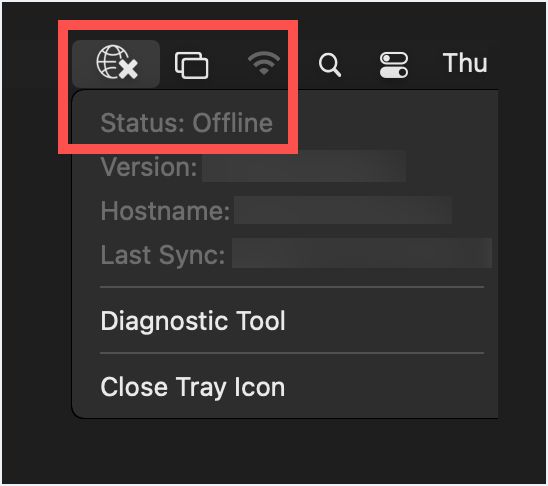
On Windows, DNSFilter is an icon in the system tray, the row of small icons near the clock. Blue or green means it is working. Red means it is not. On a Mac, it is a globe icon in the menu bar at the top of the screen. A check mark means it is working. An X and the word Offline mean it is not. You do not need to click it.
2. The block page
When DNSFilter turns a site away, your browser shows a plain page with a red bar and a warning triangle. It says The domain [site name] is blocked due to a network filtering policy. Under that is your IP address and the time. Some versions of the page name the reason instead, such as Phishing or Adult Content. There is nothing to click and nothing to enter.
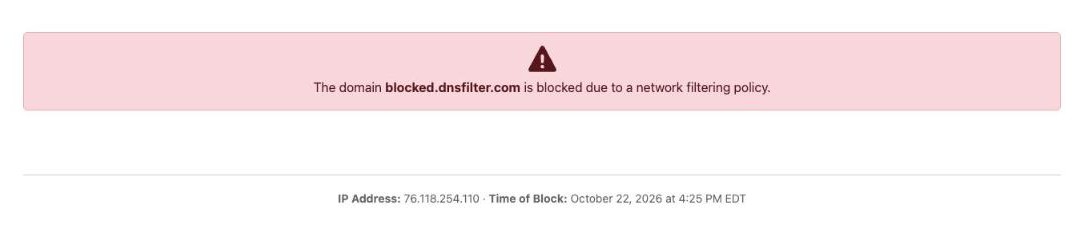
On some sites you get your browser’s own error instead, such as Your connection is not private or This site is not secure. That is the same thing. The site was turned away before the page could load.
3. A one-time prompt on a Mac
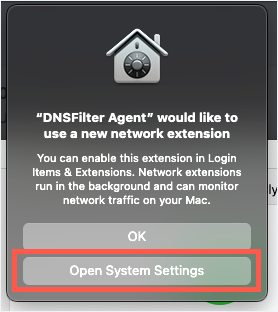
When DNSFilter is installed or updated on a Mac, you may get a prompt that says “DNSFilter Agent” would like to use a new network extension, then one that says it would like to Add DNS Proxy Configurations. Click Open System Settings on the first one, turn on DNSFilter Agent under Network Extensions, and click Allow on the second. You may be asked for your Mac password. If you click OK or Don’t Allow instead, DNSFilter installs but does not run, and the icon shows an X.
What to do when…
A site you need for work shows the block page. Send the site address and what you were trying to do to your IT contact. They can check it and pass it to us if it needs a change. If your firm has no IT contact, email support@adeliarisk.com. The block page itself has no request button. Do not try to get there another way. A personal hotspot, a VPN, or a “proxy” site goes around the filter, and those sites are on the list too.
You clicked a link in an email and got the block page. Close the tab. That is the filter doing its job. If you typed a password or any other information into a page before the block appeared, contact your IT team the same day.
The block page is not an accusation. Ads, redirects, and typos land people on these sites all the time. Hitting one does not send an alert to anyone. The log exists for troubleshooting.
Nothing loads, or only some sites load. Check the icon. If it is red, or shows an X or Offline, restart the computer. If that does not fix it, tell your IT contact and mention DNSFilter. If the internet works on your phone’s hotspot but not on the office network, say that too. It helps narrow things down.
A shared drive, printer, or internal website stopped working after DNSFilter was installed. Tell your IT contact the name of the drive or site. DNSFilter has a setting for internal names and it may need yours added.
A Mac prompt asks you to approve an extension or enter your password. Approve it. See the Mac section above. DNSFilter updates itself from time to time, and an update can ask again.
You got a new computer, or your old one was wiped. DNSFilter has to be installed again. Ask your IT contact for the installer and the site key. The site key is for your firm only. Do not forward it or paste it in a chat.
You want to check that it is working. Go to debug.dnsfilter.com. The page lists the kinds of sites DNSFilter is filtering for your computer. If every row is unchecked, DNSFilter is not running. Tell your IT contact.
You want to turn it off. Do not. It is set up so that it cannot be removed without a code. If it is causing a problem, tell your IT contact and they will work it out with us.
You work from home or travel. Nothing changes. DNSFilter goes with the computer and works on any network.
Need help?
Start with your IT team for anything on this page. They know your setup and can reach us when something needs a change on our side. If your firm does not have an IT team, or they ask you to contact us directly, email support@adeliarisk.com or call (888) 646-1616.
Adelia Risk tests and uses all of the products described on this page before providing them to clients. There is always a possibility that a security product will conflict with part of your IT setup. If that happens, Adelia Risk will make best efforts to resolve the conflict. If a conflict cannot be resolved, the product will be removed from your agreement and the monthly fee adjusted.