
Adelia Risk connects a service called Avanan to your firm’s Google Workspace or Microsoft 365 email. It scans incoming email for phishing, malware, and scams and holds back the ones that look dangerous. Check Point owns Avanan, so you will see both names. This page shows what you will get from it and what to do.
Why we use it
Most attacks on small firms start with an email. Avanan checks the links, the attachments, and the sender of every incoming message, which helps catch the ones Google or Microsoft miss.
What you will see
1. A daily report email
On days when Avanan catches something, you get an email with the subject Quarantined and Spam/Junk Email Report. It comes from no-reply@avanan-mail.net and the sender name is Avanan Cloud Security. It usually arrives late in the afternoon. On days when nothing was caught, there is no report. Some people get one most days and some get one a month.
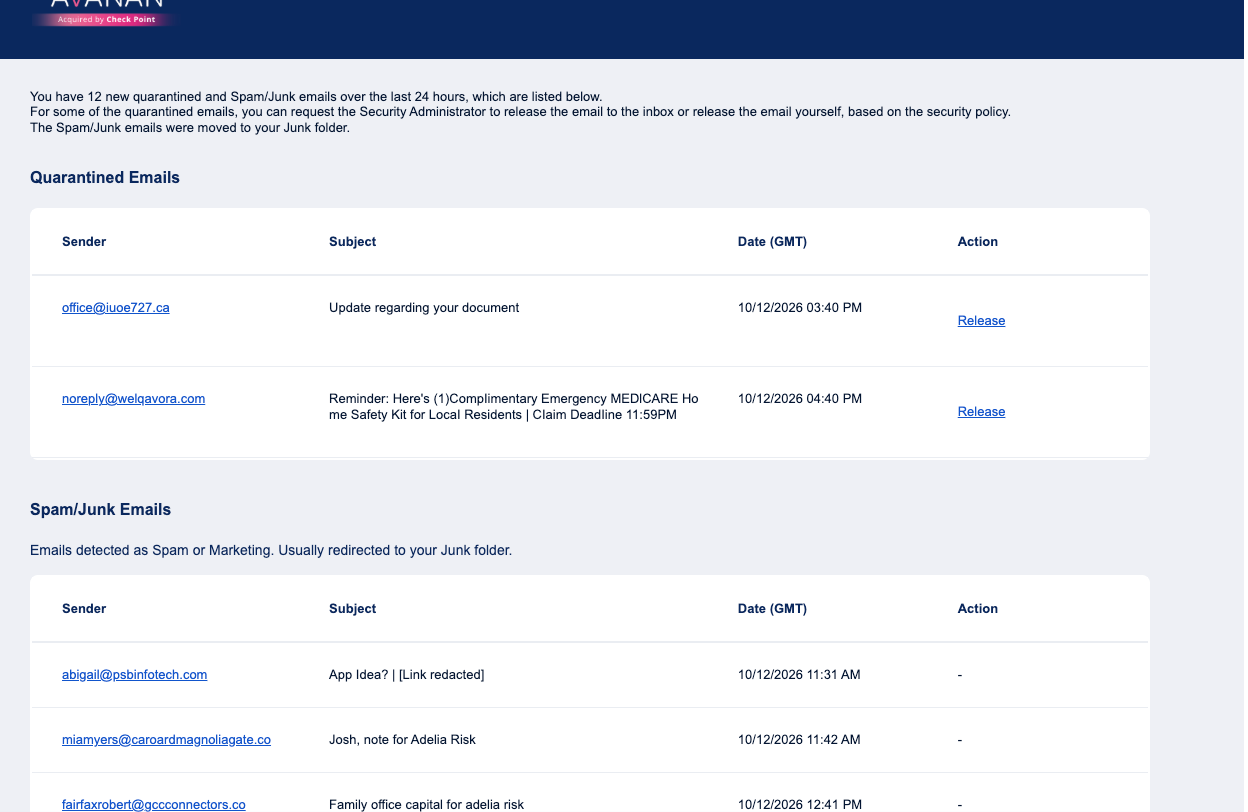
The report has two sections.
- Quarantined Emails are messages Avanan held back because they looked dangerous. They are not in your inbox. Each one has a Release link.
- Spam/Junk Emails are messages Avanan moved to your Spam or Junk folder. They are still there if you need them. Depending on how your firm is set up, this section may be empty most days.
2. A notice when something is quarantined
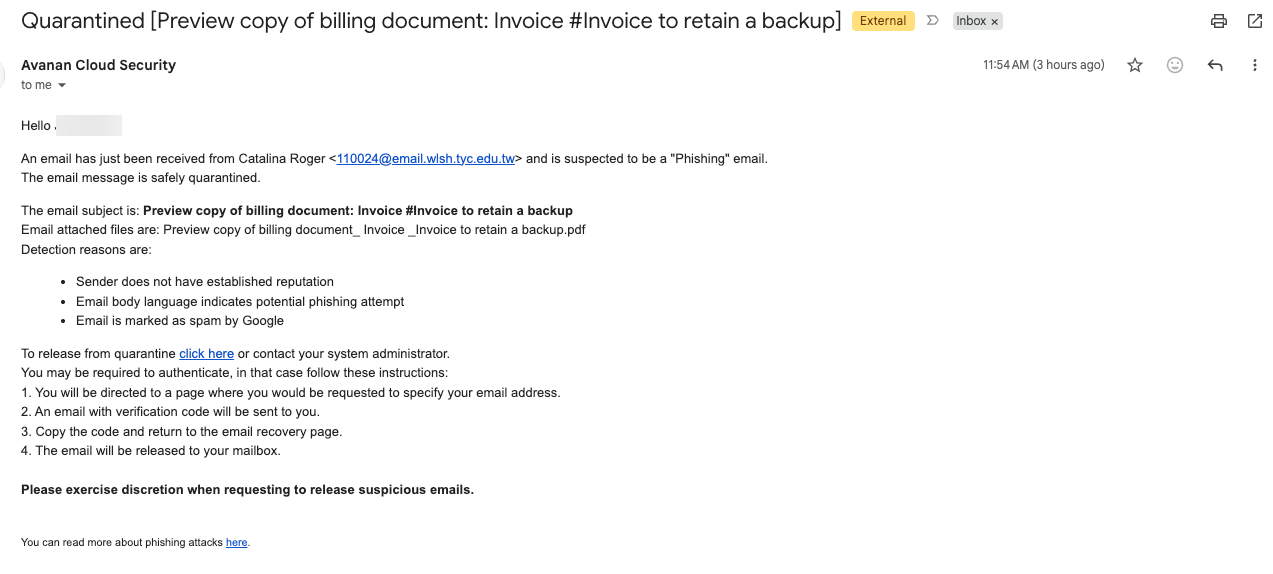
You do not have to wait for the daily report. When Avanan quarantines a message, it sends you an email with the subject Quarantined [the original subject line], from the same sender. It names who sent the message, lists the reasons it was caught, and has a click here link to release it.
3. Warning banners on some emails
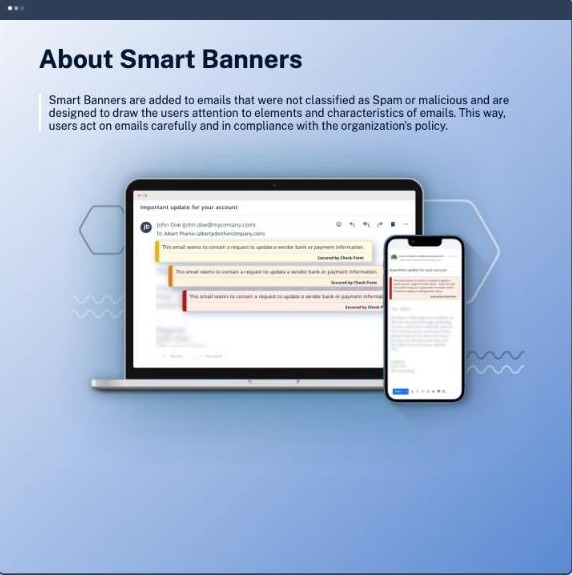
Some firms have banners turned on. When they are on, an email that is not dangerous enough to quarantine, but has a trait worth a second look, arrives with a colored bar across the top. Examples:
- A request to update payment or bank details
- An invoice from a vendor you have never received email from before
- A sender whose display name does not match the email address
- A sender address that looks almost, but not quite, like someone you know
A banner does not mean the email is bad. It means slow down and check before you act on it.
What to do when…
You were expecting an email and it was quarantined. Click Release in the daily report, or click here in the notice. A page asks for your email address. A code is emailed to you. Enter the code and the message is released to your inbox. Use the code right away. It expires after about 10 minutes, and three wrong tries lock you out for a while. If you are not sure the email is safe, do not release it. Ask your IT contact.
The link says Request to Release instead of Release. Your firm chose to have someone approve releases. Click it and wait. The request goes to the people who manage Avanan for your firm.
The release page asks for a password or an MFA code. You landed on the admin sign-in. Go back to the email and use the link again. If you are asked to sign in, choose Sign in with Google or Sign in with Microsoft and use your work account.
An email showed up in your inbox and then disappeared. Avanan scans some mail a few seconds after it lands and pulls it out if it is bad. You will usually get the Quarantined notice a minute later. Do not go looking for the message.
A real email keeps landing in Spam. Marking it Not spam in Gmail or Outlook does not always help, because Avanan does its own sorting. Send the sender’s email address to your IT contact or to support@adeliarisk.com and ask for it to be added to the trusted senders list.
An email asks you to change where money goes. New bank details, a new wire address, an urgent payment. Even with no banner, call the sender at a phone number you already have on file. Do not use a number from the email.
A phishing email made it to your inbox. Do not click anything in it. If your firm has the KnowBe4 Phish Alert Button, the orange hook in your email, use it. If not, forward the email to your IT contact and delete it.
You clicked a link in a phishing email or typed in a password. Contact your IT team right away. Do not wait to see what happens.
You want to see everything Avanan has held for you. Go to email-security-portal.avanan.net and sign in with your Google or Microsoft work account. The portal lists your quarantined messages and lets you release them from there. Not every firm has this turned on.
Need help?
For a phishing email you clicked or replied to, contact your IT team. For questions about Avanan itself, email support@adeliarisk.com or call (888) 646-1616.
Adelia Risk tests and uses all of the products described on this page before providing them to clients. There is always a possibility that a security product will conflict with part of your IT setup. If that happens, Adelia Risk will make best efforts to resolve the conflict. If a conflict cannot be resolved, the product will be removed from your agreement and the monthly fee adjusted.