
Adelia Risk installs a program called SentinelOne on your work computer. It is the antivirus. It watches what programs do and, when one starts acting like malware, it can shut the program down and lock the file away on its own. Most people never notice it. This page shows the few things you might see and what to do about each one.
Why we use it
Most attacks on a small firm start on one computer, with an attachment, a download, or a fake update. SentinelOne helps catch the program while it runs, which reduces the risk that one bad click turns into locked files or stolen passwords.
What you will see
1. A small icon that is usually quiet
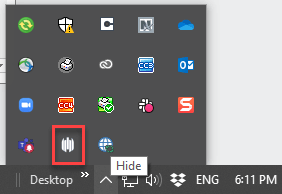
On a Mac, SentinelOne is a purple icon in the menu bar at the top of the screen. On Windows, it is in the system tray, the row of small icons near the clock. Click the icon and a window opens with the current status, threat history, and quarantined files. You do not need to open it. A plain icon means it is working. A dot or a warning on the icon means read the message in the window.
2. A notification that SentinelOne caught something
When SentinelOne acts on a file, it uses your computer’s normal notifications. On a Mac that is a banner at the top right from SentinelAgent. On Windows it is a pop-up at the bottom right. It names the file and says what SentinelOne did, most often Kill and Quarantine. By the time you see it, the file has already been dealt with, and Adelia Risk and your IT contact get an email about it. A quarantined file vanishes from where it was. It is not deleted. It is locked away where nothing can run it, and it can be put back from the console if it turns out to be safe.
3. Permission prompts on a Mac
Windows installs are quiet. Mac installs are not. Apple makes the person at the keyboard approve a few things before SentinelOne can see everything it needs to. Until that is done, the icon says Needs user attention, and you may get notifications such as Authorize Full-Disk-Access to SentinelOne in System Preferences or Authorize SentinelOne Network Extension in System Preferences.
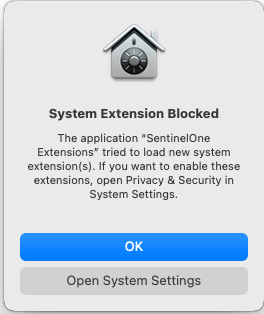
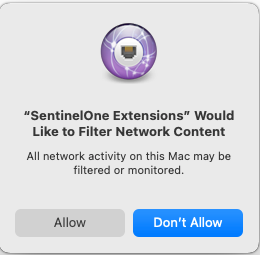
Do these three things, in order. You need an administrator password for the Mac. It is normally a one-time job; a macOS upgrade can occasionally ask again.
- Full Disk Access. Open System Settings, then Privacy & Security, then Full Disk Access. Click +, press Command-Shift-G, and paste /Library/Sentinel/sentinel-agent.bundle/Contents/MacOS/. Select sentineld, sentineld_helper, and sentineld_shell, click Open, and make sure each one is turned on.
- Network extension. If you see System Extension Blocked, click Open System Settings, then Allow next to the line that says SentinelOne Extensions was blocked. On newer Macs, go to System Settings, General, Login Items & Extensions, Network Extensions, and turn on SentinelOne Extensions. When the Mac asks whether SentinelOne Extensions may filter network content, click Allow.
- Notifications. Open System Settings, then Notifications, find SentinelAgent, and turn on Allow Notifications. Without this you will not see item 2.
What to do when…
A notification says SentinelOne killed or quarantined a file. Leave it alone. Do not reopen the file, rerun the program, or download it again from somewhere else. If you had just opened an attachment or installed something, tell your IT contact what it was. If you typed a password or were in the middle of a wire or a client login on that computer, tell your IT team now, do not wait.
A program or file you need disappeared or will not run. Specialty software, scripts, and some IT tools look like malware to a behavior-based product. Send your IT contact the name of the program and what you were doing. They can check it and pass it to Adelia Risk if it needs to be restored or excluded. If your firm has no IT contact, email support@adeliarisk.com. Do not reinstall it from another source in the meantime.
The icon says Needs user attention, or it is missing. Needs user attention means one of the three Mac permissions above was skipped. Work through them again. A missing icon means SentinelOne is not installed or was removed. Either way, if a restart does not fix it, tell your IT contact. A computer with no icon is a computer nobody is watching.
Your computer feels slow. Right after an install, SentinelOne scans the whole disk once, and the computer can be sluggish for an hour or so. If it stays slow for days, tell your IT contact and mention SentinelOne. Do not remove it to test the theory. It cannot be removed without approval from the console anyway.
Windows asks about restarting during the install. The installer says Some Dynamic Monitoring capabilities will be enabled after the next endpoint restart. Restart when you can. Protection is not complete until you do.
You have another antivirus. Uninstall it first. Norton, McAfee, Avast, Sophos, Webroot, and similar products fight with SentinelOne and slow the computer down. Windows Defender is the exception. It steps aside on its own.
You got a new computer, or your old one was wiped. SentinelOne does not move over with your files. Ask your IT contact for the installer and your firm’s site token, a long string of letters and numbers that ties the computer to your firm’s account. Do not forward the token or paste it in a chat.
You want to turn it off. Do not. If it is causing a problem, tell your IT contact and they will work it out with Adelia Risk. It goes with the computer and works the same at home or on the road.
Need help?
Start with your IT team for anything on this page. They know your setup and can reach us when something needs a change on our side. If your firm does not have an IT team, or they ask you to contact us directly, email support@adeliarisk.com or call (888) 646-1616.
Adelia Risk tests and uses all of the products described on this page before providing them to clients. There is always a possibility that a security product will conflict with part of your IT setup. If that happens, Adelia Risk will make best efforts to resolve the conflict. If a conflict cannot be resolved, the product will be removed from your agreement and the monthly fee adjusted.