
Adelia Risk runs a security awareness program for your firm using a service called KnowBe4. You will get a short training video once a month, a fake phishing email once a month, and a button in your email for reporting suspicious messages. This page shows what each one looks like and what to do.
Why we do this
Email filters catch most phishing. The ones that get through are aimed at a person, not a system. Training and practice make those harder to fall for, and your firm’s regulators and insurers expect both.
What you will see
1. A welcome email
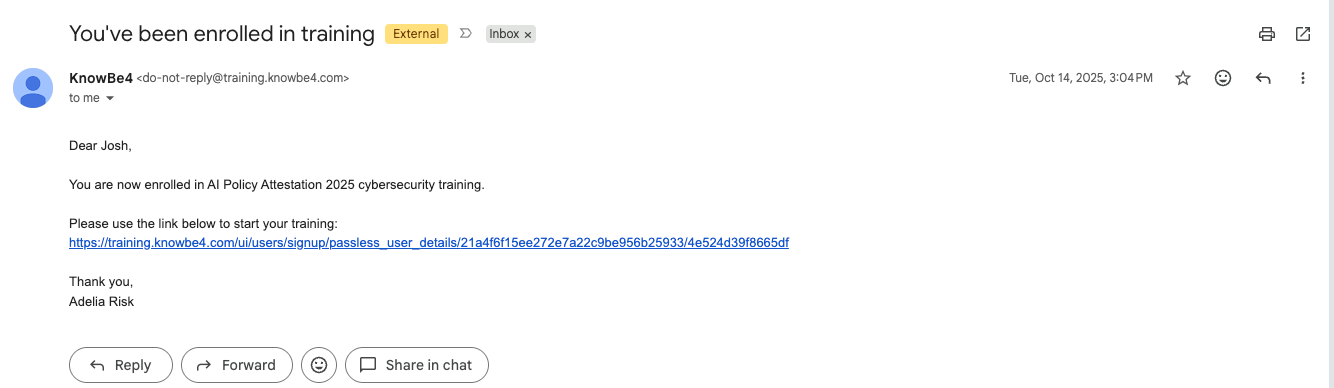
When you are added to KnowBe4, you get an email with the subject You’ve been enrolled in training. It comes from do-not-reply@training.knowbe4.com, the sender name is KnowBe4, and it is signed Adelia Risk. The link signs you in with no password.
2. A training assignment each month
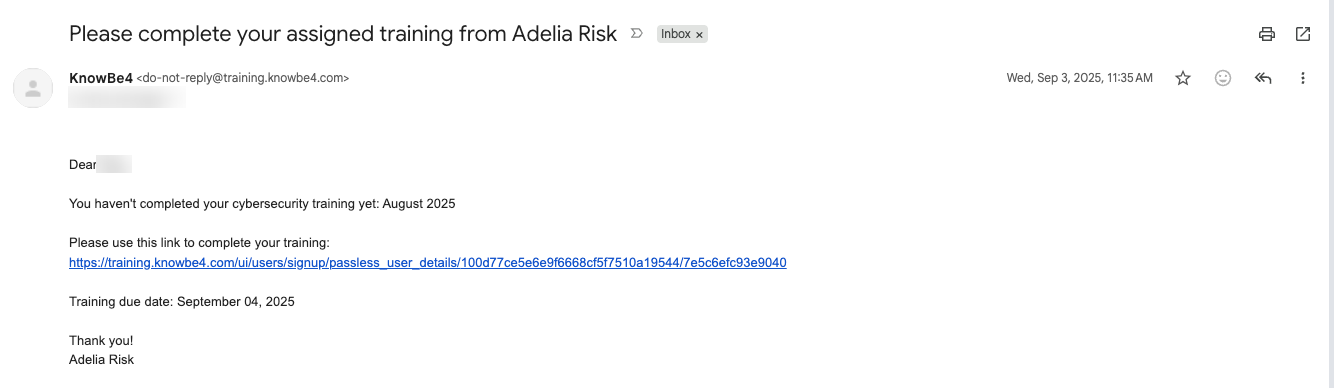
Once a month you get an email with the subject Please complete your assigned cybersecurity training from Adelia Risk. It has a link and a due date about 30 days out. The training is one short video and a few questions. It takes 5 minutes or less.
If you have not finished it, KnowBe4 sends a reminder once a week with the subject Please complete your assigned training from Adelia Risk.
3. Fake phishing emails
About once a month, usually in the second week, everyone at your firm gets a simulated phishing email. They look like real emails: a package notice, a shared document, a note from HR, a message from your CEO. Each person gets a different one and there is no warning label.
If you click the link, open the attachment, or type anything into the page, you land on a page that tells you it was a test. Nothing is installed and nothing is taken. Your firm’s compliance contact sees the result.
4. The Phish Alert Button
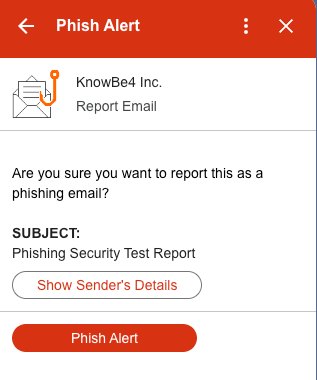
The Phish Alert Button is an orange fish hook. In Outlook it is on the ribbon at the top of an open email. In Gmail it is in the panel on the right side of the screen. In the Outlook phone app it is under the three-dot menu.
Click the hook, then click Phish Alert to confirm. The email leaves your inbox. If it was one of our tests, you get a success message. If it was not, the email goes to your firm’s IT contact and to KnowBe4 for review, with [Phish Alert] at the front of the subject line.
What to do when…
You get a suspicious email. Do not click anything in it. Click the orange hook and confirm. If you are not sure, report it anyway.
You clicked a link in a test. Read the page that explains what gave it away. There is no penalty. If you typed a password into a test page, change that password.
You clicked a link in a real phishing email, or typed in a password. Contact your IT team right away. Do not wait to see what happens.
You got a training assignment and you are busy. You have about 30 days. The link still works after the due date. If the link says the training is closed, wait for a new email or write to support@adeliarisk.com.
You are not sure if an email is a test or real. Report it with the button either way. If it was a test, you see the success message. If it was real, your IT team takes it from there.
The button is not showing in your email. Restart Outlook or reload Gmail. In the new Outlook and Outlook on the web, look under the apps icon on an open email instead of the ribbon. If it is still missing, tell your IT team. Until it is fixed, forward suspicious emails to them instead.
You reported an email by mistake. It is in your Trash or Deleted Items folder. Move it back.
You think a phishing test was reported as a mistake. This can happen. Forwarding a simulated phishing email to warn others may affect campaign tracking and make it appear that someone clicked a link or opened an attachment. If you want to warn colleagues about a suspicious email, use the Phish Alert Button to report it or share a screenshot with them instead of forwarding the original email.
You are an admin and the training link lands you on a dashboard. Click your email address in the top right corner and choose My Training.
Need help?
For a phishing email you clicked or replied to, contact your IT team. For questions about the training itself, email support@adeliarisk.com or call (888) 646-1616.
Adelia Risk tests and uses all of the products described on this page before providing them to clients. There is always a possibility that a security product will conflict with part of your IT setup. If that happens, Adelia Risk will make best efforts to resolve the conflict. If a conflict cannot be resolved, the product will be removed from your agreement and the monthly fee adjusted.